




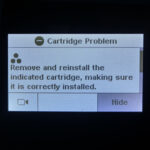
When replacing ink cartridges in your Hewlett Packard printer, occasionally the original or remanufactured HP 302 or 304 ink cartridge will not be recognised. The full message is likely to read…
“Remove and Reinstall the Indicated Cartridge, making sure it is correctly installed.”
Whilst this can normally be resolved with some simple troubleshooting (like that found here), it can be difficult to determine which cartridge your printer has a problem with.

What does each symbol mean?
With the 302 and 304 ink cartridges, Hewlett Packard indicate whether it is the black or colour cartridge with a small symbol found under the “The Following Ink Cartridge must be replaced” message. From the black and white symbols alone, it is not always particularly obvious which cartridge needs changing, especially with compatible or refilled cartridges that no longer have the original label.
Which symbol represents the black and tri-colour cartridge is shown on the aforementioned label and for this range, but we have detailed which represents which below…

A single large dot indicates the black cartridge, but the tri-colour cartridge is shown as three smaller black dots. The colour symbol represents the cyan, magenta and yellow ink within, but is somewhat misleadingly shown as a black symbol still, due to the limitations of the monochromatic screens used by some of these printers.
Which printers does this relate to?
This advice relates to the HP 302 Black (F6U66AE), HP 302XL High Capacity Black(F6U68AE), HP 302 Tri-Colour (F6U65AE) and the HP 302XL High Capacity Tri-Colour (F6U67AE) ink cartridges. These ink cartridges can be used in the printers below.
- HP Deskjet 1110
- HP Deskjet 2130 All-in-One
- HP Deskjet 2132 All-in-One
- HP Deskjet 2134 All-in-One
- HP Deskjet 3630
- HP Deskjet 3632
- HP DeskJet 3634 All-in-One
- HP Deskjet 3636 All-in-One
- HP Deskjet 3637 All-in-One
- HP Deskjet 3638 All-In-One
- HP DeskJet 3639 All-in-One
- HP Envy 4511 All-in-One
- HP Envy 4512 All-in-One
- HP Envy 4516 All-in-One
- HP Envy 4520 All-in-One
- HP Envy 4522 All-in-One
- HP Envy 4523 All-in-One
- HP Envy 4524 All-in-One
- HP Envy 4525 All-in-One
- HP Envy 4526 All-in-One
- HP Envy 4527 All-in-One
- HP Envy 4528 All-in-One
- HP Officejet 3830 All-in-One
- HP Officejet 3831 All-in-One
- HP Officejet 3832 All-in-One
- HP Officejet 3833
- HP Officejet 3834
- HP Officejet 3835
- HP Officejet 4650 All-in-One
- HP Officejet 4652 All-in-One
- HP Officejet 4654 All-in-One
- HP Officejet 4655 All-in-One
- HP Officejet 4656 All-in-One
- HP Officejet 4658 All-in-One
- HP OfficeJet 5200 Series
- HP Officejet 5230
- HP OfficeJet 5232 All-in-One
In addition to this ink cartridge range, these symbols pictured above are also used with the HP 304 Black (N9K06AE), HP 304XL High Capacity Black (N9K08AE), HP 304 Tri-Colour (N9K05AE) and HP 304XL High Capacity Tri-Colour (N9K07AE) ink cartridges. This range is compatible with the…
- HP AMP 130
- HP Deskjet 2600 Series
- HP Deskjet 2620
- HP Deskjet 2622
- HP Deskjet 2630
- HP Deskjet 2632
- HP Deskjet 2633
- HP Deskjet 2634
- HP DeskJet 3700
- HP Deskjet 3720
- HP DeskJet 3730
- HP Deskjet 3732
- HP Deskjet 3733 All-in-One
- HP Deskjet 3735
- HP Deskjet 3750
- HP Deskjet 3760
- HP DeskJet 3762 All-in-One Printer
- HP Envy 5000 All-in-One Series
- HP Envy 5010
- HP Envy 5020 All-in-One
- HP Envy 5030 All-in-One
- HP Envy 5032 All-in-One
You can also follow the links above to these printers individual listings on our store and view everything we currently stock for your inkjet printer.
We hope you have found this brief article useful, but please let us know via any of our social media platforms if you have anything to add.

