





How many times an ink cartridge can be refilled is a very common question and when I address it below I am talking specifically about cartridges that have a printhead attached. If you have a two cartridge printer manufactured by HP, Canon, Dell and Lexmark you will almost certainly be familiar with this design. A full list of applicable cartridges can be found below:
[hide-this-part morelink=”Show Compatibility”]
- Canon Black PG-37/2145B001, PG-40/0615B001, PG-50/0616B001
- Canon Black PG-510/2970B001AA, PG-512/2969B001AA
- Canon Colour CL-38/2146B001, CL-41/0617B001, CL-51/0618B001
- Canon Colour CL-511/2972B001AA, CL-513/2971B001AA
- Dell Black T0529/592-10039
- Dell Colour JF333/592-10177
- Dell Colour T0530/592-10040
- Hewlett Packard Black HP 21/C9351AE, HP 21XL/C9351CE, HP 27/C8727AN, HP 56/C6656AE
- Hewlett Packard Black HP 300/CC640EE, HP 300XL/CC641EE, HP 901/CC653AE, HP 901XL/CC654AE, HP 336/C9362EE, HP 337/C9364EE, HP 338/C8765EE, HP 350/CB335EE, HP 301/CH562EE, HP 301XL/CH563EE
- Hewlett Packard Black HP 339/C8767EE, HP 350XL/CB336EE
- Hewlett Packard Colour HP 22/C9352AE, HP 22XL/C9352CE, HP 28/C8728AN, HP 57/C6657A
- Hewlett Packard Colour HP 110/CB304AE
- Hewlett Packard Colour HP 300/CC643EE, HP 300XL/CC644EE, HP 901/CC656AE
- Hewlett Packard Colour HP 301/CH562EE, HP 301XL/CH564EE
- Hewlett Packard Colour HP 351/CB337EE, HP 351XL/CB338EE, HP 342/C9361EE, HP 343/C8766EE, HP 344/C9363EE
- Hewlett Packard Photo HP 58/C6658AE
- Hewlett Packard Photo HP 348/C9369EE
- Lexmark Black 3/018C1530, 32/0080D2956, 34/018C0034E, 36A/018C2150E, 36XLA/018C2190E, 14A/018C2080E, 42A/018Y0342E, 44XL/018Y0144E, 4A/44103105
- Lexmark Black 16/010N0016E, 17/010NX217E
- Lexmark Black 82/018L0032E
- Lexmark Colour 1/018CX781E, 2/018C0190E, 33/018CX033E, 35/018C0035E, 37A/018C2160E, 37XLA/018C2200E, 15A/018C2100E, 41A/018Y0341E, 43XL/018YX143E, 5A/18C1970E
- Lexmark Colour 26/010N0026E, 27/010NX227E
- Lexmark Colour 83/018L0042E
- Lexmark Photo 31/018C0031E
[/hide-this-part]

Sadly, there is no cut and dry answer to the number of times an ink cartridge can be refilled. As the original printer cartridge manufacturers have designed these units to only be used once, sometimes an additional refill simply doesn’t take. On the flip side of the coin, I have known people to get a dozen refills out of a single cartridge. To help prolong the life of your cartridge, I recommend refilling your cartridges before they run completely empty and not leaving them to dry out for too long. There are however several parts of this type of ink cartridge that if properly maintained can extend the life of a cartridge as described below.
Contacts
 The gold dots seen on the coppery strip of this cartridge are actually the electronic contacts the printer uses to identify the cartridge. If any of these contacts are damaged/obscured or if the lines running the length of the strip become scratched or soiled, this can disrupt or even stop communication between the cartridge and the printer. Even the natural oils from your hands can cause a problem. As such, I would recommend avoiding touching these contacts whenever possible.
If however your printer cannot recognise the installed cartridge, I would recommend removing the cartridge from the printer and giving them a firm wipe one or twice with a piece of non-fibrous tissue (like kitchen tissue).
Printhead
 These cartridges use a series of tiny nozzles located in the printhead to spray ink directly onto the paper when printing. After continued use or if the cartridge has been left unused for some time, the nozzles in question can become dried or clogged and leave stripes of one or more colours absent from your prints. If you have experienced such a print quality problem I would recommend performing the cleaning procedure described here.
Due to the large amount of microscopic parts in the printhead, mechanical problems that can occur that will either severely affect the quality of your prints or stop any ink coming from the cartridge at all. Sadly mechanical problems with the printhead are terminal and cannot be resolved by an end user.
Sponges
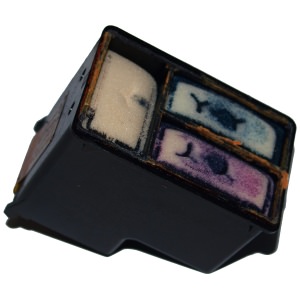
The ink inside your cartridge is retained by sponges that control the flow of the ink.
If you have just refilled your cartridge and are finding the colours are absent from your prints immediately, it is entirely possible the position of the ink inside the cartridge is the cause. For our full guide to refilling these cartridges including needle position please click here, otherwise you may want to check out our article on troubleshooting print quality problems here.
I hope you have found this guide useful. If you have anything to add or want to let us know of your experiences with these cartridges, please get in touch via any of our social media platforms.

