




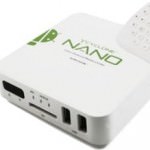
The Sumvision Cyclone Nano Smart Android Media Center allows you to play video, listen to music, browse the web or use any of the 450,000+ apps available on the android marketplace. It is not without its faults but with the rich set of features and a low price tag it should be a worthwhile purchase for most homes.
Video Review
Functionality
Anyone familiar with the Android operating system will feel right at home as the Cyclone Nano uses a reskinned version of Android used on the majority of smartphones. In fact if you delve into the settings you should find the device referred to as a phone in several places. Full specifications can be found below.
[hide-this-part morelink=”Show Specs”]ROM: 2GB NAND
Connectivity: Wifi and RJ45
RAM: 512MB
Built in Flash Memory: 4GB
Connection Option: HDMI and CVBS
Video Output: 1080p
Video Codec Support: MEPG 1/2/4, H.264, VC-1, Xvid, RMVB, VP6
Device Interface: Air Mouse/Keyboard Remote
Picture Format Support: JPG, BMP, GUF, TIFF, PNG
Subtitle Support: SRT, SUB, IDX, SSA, SMI
Support: Network Supports – Media player adapter, e-mail, internet surfing, gaming social networking, e-book and much more.
Functionality: Media player adapter, e-mail, internet surfing, gaming social networking, e-book and much more.
Video Container: MKV, TS, M2TS, RM/ MVB/ AVI/ MPG, VOB, FLV
CPU: A9 ARM Cortex 800MHz[/hide-this-part]
Whilst the device can output 1080p HD picture quality with ease it is worthwhile noting many apps available on the Android Marketplace are designed to be used on a much smaller mobile screen. For example if you were planning on using the media center as a dedicated player for Netflix or other streaming services you may be disappointed with the current quality.
Setup
Setting up the Cyclone Nano couldn’t be easier you simply insert the power cable and the HDMI/RCA cable and you are good to go. However if you have the version of the player that comes with the “Freestyle Air Mouse” you will have to use up one of the USB ports immediately with the wireless receiver for the remote. You can connect wirelessly from the device or connect it to your network via an Ethernet cable depending upon which you prefer. The biggest problem I encountered during setup was that the manual provided was referring to a slightly different version of the product with a power button and a different style remote but a quick call to Sumvision clarified what I had to do.

Ease of Use
There are two main ways of using the Cyclone Nano Media Center. Most people will simply use the standard Android smartphone/tablet interface that lets you navigate apps and widgets on multiple panes. You can however use the “Media Interface” that is reminiscent of Windows Media Centre that offers a more streamlined use of the files and applications you have stored.
The Freesytle Air Mouse has a standard qwerty keyboard with a few dedicated function keys which comes in handy when browsing web-pages. It can also be used like a Wii remote with most applications and is essential when playing games like Angry Birds or Fruit Ninja. You bring up the pointer by holding the central button and move you hand to alter its position. This control method works well most of the time but in order to left and right click you must move your thumb left and right which takes a little getting used to if you need to continuously hold a button down.
Our Verdict
The Sumvision Cyclone Nano Smart Android Media Center works great as a media player and with the addition of hundreds of thousands of Android apps to keep you busy there is always something to keep you entertained. You can normally pick one up for around £80 so it is a great way of browsing the web, casual gaming or getting your social media fix from the comfort of your sofa without slashing out on a expensive smart TV. It is worthwhile bearing in mind that not all of the apps are ready to be used at full 1080p HD quality so fans of on demand TV and movies may want to stick to their favourite games console.
Let us know your thought on this product, via any of our social media platforms.

