





This guide is specifically for a refilled cartridge that has the printhead attached as commonly found in two cartridge printers manufactured by HP, Canon, Dell and Lexmark. A full compatibility list can be found below:
[hide-this-part morelink=”Show Compatibility”]
- Canon Black PG-37/2145B001, PG-40/0615B001, PG-50/0616B001
- Canon Black PG-510/2970B001AA, PG-512/2969B001AA
- Canon Colour CL-38/2146B001, CL-41/0617B001, CL-51/0618B001
- Canon Colour CL-511/2972B001AA, CL-513/2971B001AA
- Dell Black T0529/592-10039
- Dell Colour JF333/592-10177
- Dell Colour T0530/592-10040
- Hewlett Packard Black HP 21/C9351AE, HP 21XL/C9351CE, HP 27/C8727AN, HP 56/C6656AE
- Hewlett Packard Black HP 300/CC640EE, HP 300XL/CC641EE, HP 901/CC653AE, HP 901XL/CC654AE, HP 336/C9362EE, HP 337/C9364EE, HP 338/C8765EE, HP 350/CB335EE, HP 301/CH562EE, HP 301XL/CH563EE
- Hewlett Packard Black HP 339/C8767EE, HP 350XL/CB336EE
- Hewlett Packard Colour HP 22/C9352AE, HP 22XL/C9352CE, HP 28/C8728AN, HP 57/C6657A
- Hewlett Packard Colour HP 110/CB304AE
- Hewlett Packard Colour HP 300/CC643EE, HP 300XL/CC644EE, HP 901/CC656AE
- Hewlett Packard Colour HP 301/CH562EE, HP 301XL/CH564EE
- Hewlett Packard Colour HP 351/CB337EE, HP 351XL/CB338EE, HP 342/C9361EE, HP 343/C8766EE, HP 344/C9363EE
- Hewlett Packard Photo HP 58/C6658AE
- Hewlett Packard Photo HP 348/C9369EE
- Lexmark Black 3/018C1530, 32/0080D2956, 34/018C0034E, 36A/018C2150E, 36XLA/018C2190E, 14A/018C2080E, 42A/018Y0342E, 44XL/018Y0144E, 4A/44103105
- Lexmark Black 16/010N0016E, 17/010NX217E
- Lexmark Black 82/018L0032E
- Lexmark Colour 1/018CX781E, 2/018C0190E, 33/018CX033E, 35/018C0035E, 37A/018C2160E, 37XLA/018C2200E, 15A/018C2100E, 41A/018Y0341E, 43XL/018YX143E, 5A/18C1970E
- Lexmark Colour 26/010N0026E, 27/010NX227E
- Lexmark Colour 83/018L0042E
- Lexmark Photo 31/018C0031E
[/hide-this-part]

Refilling your own ink cartridges may seem like an ideal solution to any home/small office user, however when refilling a cartridge with the printhead attached the results can be a little less reliable. The most common problems are stripped prints or the cartridge not printing at all resulting in your printer spitting out blank pages.
These issues are a direct result of the cartridge not being filled in a vacuum (as they are when they are done professionally). Once the seal of the vacuum is broken the ink distributes itself into the surrounding sponge and the printhead, rather than renaming localised around where the point of the syringe was when the was injected. For this reason we always recommend getting the point of the syringe as close to the printhead as possible without puncturing it.
 If you are confident that the ink was injected into the optimum part of the sponge but the cartridge still does not print I would recommend taking the following steps that both freshen up the printhead and encourage ink to flow from the cartridge:
- First off please run any printer head cleaning cycles available from your printer software and check the quality of your prints.
- Fold a piece of kitchen tissue or any other non fibrous tissue and dab it under a tap to make a small damp patch. For best results make sure the water is warm.

- Take the cartridge out of the printer and hold the damp patch over the printhead for 30-60 seconds.

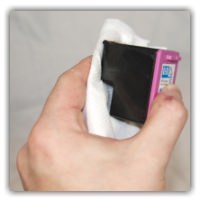
- You should now hopefully have a small ink soaked patch on the tissue with traces of all the relevant colours.
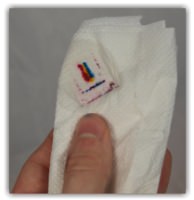
- Then wipe the printhead several times on the dry part of the tissue and you should start to see the colours come through.
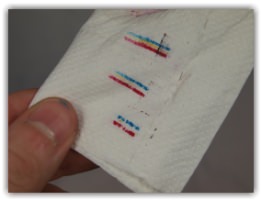
- Reinstall and run one more head cleaning cycle and with any luck you should be ready to print.
If the problem remains I would recommend either getting the cartridge refilled professionally or purchasing a remanufactured replacement. I hope this guide has helped, but if you have any questions or anything else to add, please get in touch via any of our social media platforms.

