




As you may or may not be aware, HP+ disables your printer’s ability to use cartridges with a non-HP Chip or use it without an internet connection. Whilst the printer’s packaging and various Hewlett Packard literature mention this, we have had multiple customers using their printer for an extended period without realising it.
I for one, am very guilty of setting up hardware and software on “autopilot” and just clicking through whatever option seems relevant until I am ready to go. If I were to have a HP+ compatible printer in my life (outside of work), I would almost certainly have found myself in the very same situation.
Is there a way to check if I have HP+?
Ascertaining if HP+ has been activated for a customer has proved a little difficult for us in the past. Both over the phone or in one of our stores, we do not necessarily have the information to hand to guide our customers to where they need to be to check.
Thankfully, Dan at our Paignton store came up with a simple method of checking, when he remembered that one of the notable perks of HP+ was the extended warranty. As we mentioned in our previous “What is HP+? Should I activate it?” post, having HP+ entitles you to a warranty of 2 years, rather than the standard 1-year offering. If your printer has this extended warranty, it must have HP+ too, right?
Great… but, how do I check my warranty with HP?
It’s simple really and HP themselves have offered an elegant way of checking it. First of all, take your printer and locate the serial number (S/N). This can typically be found on a sticker on the back of the printer and should be marked as such.
With the printer serial number to hand, click the link below to be taken to the ‘HP Customer Support – Product Warranty Check’ tool.
https://support.hp.com/gb-en/checkwarranty
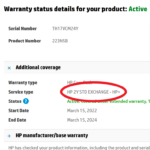
Now enter your printer serial number and click “Check Warranty” to be presented with the warranty status of your machine. In addition to seeing if the warranty is active or not, there are a few other bits of information listed below it.
I would advise paying particular attention to the ‘Service type’ listed. On Our HP+ enabled machine, we have “HP 2YR STD EXCHANGE – HP+“ mentioned. However, on our second HP+ compatible machine where we bypassed activating HP+, we have “Wty: HP HW Replacement Support” instead.

If you need further confirmation, you can see that the warranty period Start and End Dates cover a 2-year period too.

Can I turn Deactivate HP+ on My Printer?
At the time of writing, sadly not. Printers with HP+ activated will require the use of Original HP Ink or Toner for the lifetime of the printer, as well as a HP account and an Internet connection. If anything changes, we will of course update this article to reflect this.
If you have any other questions or comments, please let us know by email or on Facebook.

