2018-07-05T10:48:40+00:00
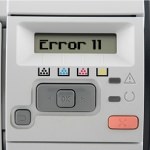
HP LaserJet Error 11 – Out of Paper
2011-10-13T15:31
October 13, 2011
If you are receiving this message please take the following steps:
- Ensure there is paper in the tray and that it is laying flat and straight.
- Remove the paper and inspect the inside of the tray to ensure no tabs, levers or arms are bent or broken.
- If “Error 11” is still showing then the paper control sensor may not be operating correctly. In this case please contact HP technical support if the machine is in warranty or a technician if the warranty has expired.
Notice
This article has been written as a general guide to the error code and as such not all of the information here will be applicable to every machine in the range. Wherever possible specific advice for certain models will be given.
About the author
Matthew Stevenson
I have been involved in the printer industry since I was 18 and have been an employee of Refresh Cartridges since early 2009. I am a dedicated family man, gamer, music fan and friend to all.
I write the majority of the content here on Igloo and am responsible for its upkeep.
Refresh Cartridges




