




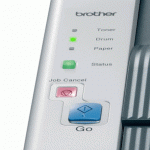
In order to use your Brother laser printer you will need both a functioning toner cartridge and drum unit. Brother toner cartridges have a built in mechanism that estimates how much toner remains in the printer, but all brother drum units currently available reply upon a prompt from the user when they are changed. If you have recently changed the DR3100 drum unit in your printer and have found the drum unit light still flashes, you will need to enter this prompt again. Entering this prompt resets an internal counter and will allow you to carry on printing without any warnings for an estimated 25,000 pages.

When it comes to the Brother DR-3100 drum unit we always recommend continuing to use your current drum unit until the quality of your prints begins to diminish. At this point change your drum unit and reset the internal counter using the method described below.
Does this reset work for my printer?
Theis reset method has been confirmed for a handful of Brother printers including the HL-5240, HL-5240L, HL-5250D and HL-5250DN.
How to Reset Brother DR3100 Drum Counter
- Press the front cover release button and open the front cover of the printer.
- Hold down the Go button for 4 seconds until all LEDs light up. Then release Go.
- Remove the drum unit and toner cartridge assembly.
- Put the drum unit and toner cartridge assembly back into the printer.
- Close the front cover of the printer
The drum LED will now of ceased flashing and will allow you to continue printing for an estimated 25,000 pages.
I hope you have found this guide useful. If you have anything to add or any further questions, please get in touch via any of our social media platforms.

