




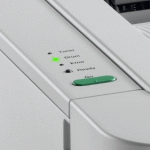
Toner cartridges and drum units are the key consumables in all Brother laser printers. Whilst all Brother toner cartridges will identify their estimated toner levels to the printer, the drum units used requires the user to inform the printer when it is changed. If the correct prompt is not given when changing the drum unit it can result in the drum LED continuing to flash even with a new drum installed.

Will this reset work for my printer?
This method of resetting the drum counter has been confirmed for the Brother HL-2130, HL-2132, HL-2135W, HL-2240, HL-2240D, HL-2250DN, HL-2270DW mono laser printers.
Drum Counter Reset Instructions
- Ensure the printer is turned on.
- Open the front cover of the printer.
- Remove the toner cartridge and drum unit assembly.
- Re-install the toner cartridge and drum unit assembly, but leave the front cover open.
- Press and hold the Go button on the printer until all four LEDs are lit.
- Release Go.
- Close the front cover of the printer.
The drum unit will now be reset, leaving you free to print for an estimated 12,000 pages.
I hope you have found this guide useful. If however you have any further queries or anything to add, please get in touch via any of our social media platforms.

