





What is this error? Why am I getting it?
After changing a HP 364, HP 364XL, HP 564, HP 564XL, HP 178, HP 178XL, HP 862 or HP 862XL ink cartridge you may recieve a message stating ‘Incompatible Older Generation Cartridge Installed’ which may followed by :
“The cartridge listed above is an older generation cartridge that does not work in your printer, which uses the latest version of the cartridge. Click Help for more information. To order a genuine HP replacement cartridge, click Shop Online.”
or…
“Incompatible older generation cartridge installed:Black/Photo Black/Cyan/Magenta/Yellow. The cartridge listed above is an older generation cartridge that does not work in your printer, which uses the latest version of the cartridge.”
This message normally manifests on newer HP Photosmart printers that are programmed by HP to only accept cartridges that have been manufacturred since September 2010. HP have stated that has been implemented so that new features can be implemented in future printer releases. However this will prevent millions of cartridges in existence that would be perfectly good for recycling being used in these printers.
If you have recieved this message fortunately it can easily be solved by changing the cartridge with one from the newer generation.
How can I tell if I have a newer generation cartridge?
Identifying a “new generation cartridge” is relatively easy. However the method is very different depending whether you have an open cartridge or are looking at one still in its retail packaging.
My cartridge is open: Simply inspect the small panel of the cartridge and look for the HP product number located on the middle line.
 If it begins with CN680, CN681, CN682, CN683, CN684, CN685, CN686, CN687, CR276, or CR277 then the cartridge is the updated version and can be used in your printer.
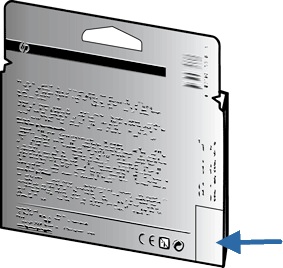
My cartridge is still it’s box: For colour cartridges and any that are not Black XL look for the “Warranty Ends” date on the back of the box. If ‘v1’ appears just to the right of the date then the cartridge is the updated version. If however ‘v1’ is not there, look to the “Warranty Ends” date mentioned earlier. A date later than September 2012 indicates the cartridge is the updated version.
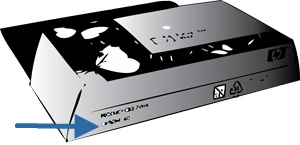
 For the Black XL cartridges look for the product number on the bottom of the box. If the cartridge has a product number starting with ‘CN684’ it is an updated version cartridge.
 I hope you have found this article useful. If you have any experience with this issue please let us know your story via any of our social media platforms..
The advice given in thie article is relevant to the following printers: [hide-this-part morelink=”Show Compatibility”]
- HP DeskJet 3070A
- HP Photosmart 5510
- HP Photosmart 5510 e-All-in-One
- HP Photosmart 5515
- HP Photosmart 6510 e-All-in-One
- HP Photosmart 7510 e-All-in-One
- HP PhotoSmart All-In-One
- HP Photosmart B109a All-In-One
- HP Photosmart B109c All-In-One
- HP Photosmart B109d All-In-One
- HP Photosmart B109f Special Edition
- HP Photosmart B109n Wireless
- HP Photosmart B109q Wireless
- HP Photosmart B110a Wireless e-All-In-One
- HP Photosmart B110c Wireless e-All-In-One
- HP Photosmart B110d Wireless e-All-In-One
- HP Photosmart B110e Wireless e-All-In-One
- HP Photosmart B8550
- HP Photosmart B8553
- HP Photosmart C5380
- HP Photosmart C5383
- HP Photosmart C5390
- HP Photosmart C6300
- HP Photosmart C6380
- HP Photosmart CN245B Wireless e-All-In-One
- HP Photosmart D5460
- HP Photosmart D7560
- HP Photosmart eStation
- HP PhotoSmart Plus All-In-One
- HP Photosmart Plus B209
- HP PhotoSmart Plus B209a
- HP PhotoSmart Plus B209b
- HP PhotoSmart Plus B209c
- HP PhotoSmart Plus e All-In-One b210
- HP PhotoSmart Plus e-All-In-One b210a
- HP PhotoSmart Plus e-All-In-One b210b
- HP PhotoSmart Plus e-All-In-One b210c
- HP PhotoSmart Plus e-All-In-One b210e
- HP Photosmart Premium All-In-One
- HP Photosmart Premium C309
- HP Photosmart Premium C309g
- HP Photosmart Premium C309h
- HP Photosmart Premium C309n
- HP Photosmart Premium C310
- HP Photosmart Premium e-All-In-One
- HP Photosmart Premium e-All-In-One C310a
- HP Photosmart Premium Fax
- HP Photosmart Premium Fax C309a
- HP Photosmart Premium Fax C309c
- HP Photosmart Premium Fax e-All-In-One C410b
[/hide-this-part]

