




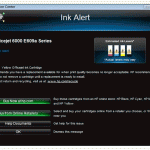
If a remanufactured, compatible or refilled HP 920 or HP 920XL cartridge has recently been installed it is likely that it warns of having low ink or even being empty. In most cases this is perfectly normal as these cartridges use chips from HP original cartridges that have been used before. The chips use a combination of counting pages and average page coverage to estimate the amount of ink inside the cartridge. As they have no way to check the physical ink level in a cartridge, a chip that has been used previously will almost certainly give a message like the one below once installed: To continue simply click OK in the bottom left of the message. As your printer will not warn you when the ink is running low we recommend keeping an eye on the quality of your prints and replacing the relevant cartridge when a colour begins to fade.
This advice is relevant for the following printers:[hide-this-part morelink=”Show Compatibility”]
HP Officejet 6000
HP OfficeJet 6000 Wireless
HP Officejet 6500 All-in-One
HP Officejet 6500 Wireless
HP Officejet 6500A e-All-in-One
HP Officejet 6500A Plus e-All-in-One
HP Officejet 7000 Wide Format
HP Officejet 7500A Wide Format
[/hide-this-part]

