




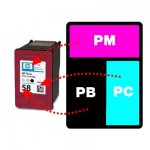

Refilling the HP 58 photo ink cartridge at home is very easy and can offer you great results, with very little equipment. All you need is at least one syringe, plus some universal photo black, photo cyan and photo magenta . Simply remove the label, widen the fill holes (if necessary) and fill the relevant chambers of the HP 58 ink cartridge with the amount of ink mentioned below.
For these cartridges, we recommend injecting the following amount of ink into each of the chambers (photo black/photo cyan/photo magenta):
HP 58/C6658AE: 6ml (18ml Total)
When purchasing the inks for refilling these cartridges, you may find them described as light magenta and light cyan. These inks are the same as the “photo” variety, so please do not worry
This guide is intended purely to show where to inject the ink into these cartridges and how much we recommend using. For full refill instructions for these cartridges, please click here.
These cartridges are compatible with a variety of HP printers, including:
-HP DeskJet 450
-HP DeskJet 450CI
-HP DeskJet 5150
-HP DeskJet 5550
-HP DeskJet 5552
-HP DeskJet 5600
-HP DeskJet 5650
-HP Officejet 6110
-HP DeskJet 5551
-HP DeskJet 5652
-HP DeskJet 5655
-HP DeskJet 3600
-HP DeskJet 3620
-HP DeskJet 3651
-HP DeskJet 3653
-HP DeskJet 3840
-HP DeskJet 3847
-HP Officejet 6612
-HP DeskJet 5151
-HP DeskJet 5160
-HP DeskJet 5168
-HP Deskjet 5510

