




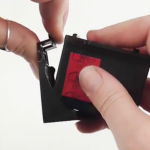
Having trouble getting your new cartridge to fit into your printer or is the new cartridge just not printing anything?
Here are a couple things to check when faced with either of these issues:
When handling the cartridge, please be careful not to touch the electronic strip or the print head.
Cartridge doesn’t fit
You have tried to insert the new cartridge into your printer but it just doesn’t fit
- Check that you have the correct cartridge for your printer, this can done by using the cartridge search wizard found on the following link https://refreshcartridges.co.uk/ink-cartridges.html
- Check you have removed the clip that is on the back of the cartridge. Just pull the clip tab back and down which should release the clip away from the cartridge
Clip is removed but isn’t printing anything
You have inserted the new cartridge and it has been successfully recognized by the printer but the print out is blank with nothing being printed
- Check that the tab that covers the print head been removed. this is a thin label that covers the print head, if left on it will creates a barrier so the ink cannot be extracted from the cartridge. Please do not confuse the tab with the copper strip, the copper strip/contact should NOT be peeled off.
- It is also worth checking the gold contacts are free from debris, such as tack from the tape.
To help illustrate these steps, Refresh Cartridge team member, Tash has made a short video showing you in detail what you need to do if you are faced with either of these issues.
The cartridges that these issues effect applies to most remanufactured, compatible and OEM cartridges.
The cartridge models include
Canon 540 / 541
Canon 545 / 546
HP 62
Hp 304
HP 300
HP 302
HP 301
Canon 510 / 511 / 512 / 513
HP 303

