




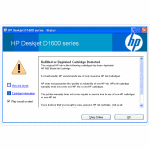
After installing HP 300XL remanufactured, refilled or compatible inkjet cartridges into your printer you will normally receive a message on screen warning of low ink or even that there is no ink in the cartridge and recommending that you replace it with a new cartridge. Most of the time it will be the message pictured below and all that is required is for you to press OK…
 However some printers will have a combination of the On button flashing and/or a message warning that the cartridge is depleted, empty or low on ink and suggest that the print job must be cancelled. In such a case simply press and hold the power button and the “X” button down together for 2 seconds and then release them both at the same time. Printing should then resume within 10 seconds.

I hope this advice helps you continue printing but if you have received a different message please let us know in the comments below and we would be happy to help.

