




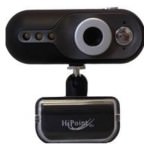
 Today we are going to be taking a look at the HiPoint VCH8-M30LA 8 megapixel webcam. This is a budget webcam that normally retails at around £10 and has a fairly typical basic design present on a multitude of commercially available webcams.
The clip and stand work well and while the specifications state it will only fit 3cm deep monitors the adjustable hinge means this camera is also an option for most lcd or laptop screens. The strategically placed rubber grips should keep the camera in place in most circumstances but may rock slightly on deeper or oddly shaped screens. Fine tuning what is in shot is made easy and will keep the camera firmly in position thanks to the flexible ball joint that fixes the camera to the base.
The VCH8-M30LA comes bundled with the same AMCAP software that has come with almost every webcam I have ever purchased. Whilst it offers nothing particularly fancy as far as features go, it is functional nonetheless.
Picture quality is average and the camera struggles to provide a decent frame rate if any kind of motion is present. The built in microphone offers a crisp clean recording quality that is as good as can be expected considering it will always be at least 1ft away from your mouth.
A feature the packaging seems particularly proud of is the 3 built in lights that apparently light you up and allow you to continue recording in darkness. However the only illumination I could find in such conditions was provided by the glow of my monitor and not from the faint glow of 3 white LEDs. Its disappointing that a feature like this would be so heavily advertised on the front of the packaging but not be at all true once you plug the camera in.
In summery whilst this is a is a pretty nice budget webcam that does what it should to an acceptable standard, it doesn’t really deliver on any additional features or give you an reason to select this model over the many other webcams out there.

