




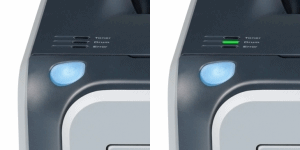
In the Brother HL-2140 and several other printers compatible with the DR2100 drum unit a prompt must be given by the user for the printer to realise a new drum has been installed. This procedure needs to be followed to reset an internal page counter in the printer that estimates the remaining life of the installed drum. If this reset is not performed then your printer will continue to warn you of ‘Drum life end soon‘. Your printer does this via the Drum LED on the body of the printer which will flash on for 2 seconds and then off for three (and repeat). Luckily the drum reset for these printers is very easy and only takes a few seconds.
What printers does this reset work for?
In addition to the Brother HL-2140 the drum reset detailed below also works for the HL-2150N and HL-2170W.
How do I reset the drum unit for these printers?
- Ensure the printer is turned on and otherwise ready to print.

- Open the front cover of your printer.
- Hold down the Go button until all LEDs are lit (this takes approximately 4 seconds).
- Remove the combined drum unit and toner cartridge assembly from your printer.
- Re-install the drum unit and toner cartridge assembly into your printer.
- Close the front cover of your printer.
The Drum LED will now of stopped blinking/flashing and you can continue printing for an estimated 12,000 pages. If the LED remains lit and is flashing in the pattern mentioned earlier then please run through this process again ensuring all LED lights are lit when holding down Go.
If you have ant further questions or have anything to add, please get in touch via any of our social media platforms.

