




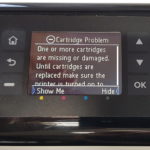
Whilst in most circumstances the “Cartridge Problem” error message relates to a an ink cartridge in the machine having a damaged or dirty chip, a new HP security measure has disabled the use of some Non-HP chips. Thankfully, Hewlett Packard have since released a firmware update that has allowed certain printers to use a wider variety of chips again.

If you have one of the HP OfficeJet Pro printers mentioned below and the error message reads “One or more cartridges appear to be damaged. Remove them and replace with new cartridges.” then you are likely to be able to benefit from this update. If however, your printer is not mentioned below or you are not using a compatible/remanufactured cartridge, we would recommend checking out our troubleshooting guide here.
- HP Officejet Pro 6950 All-in-One
- HP Officejet Pro 6230 ePrinter
- HP Officejet Pro 6830 e-All-in-One
- HP Officejet Pro 6970 All-in-One
- HP Officejet Pro 7740
- HP Officejet Pro 8210
- HP Officejet Pro 8610 e-All-in-One
- HP Officejet Pro 8620 e-All-in-One
- HP Officejet Pro X451DW
- HP Officejet Pro X476DW
- HP Officejet Pro X551DW
- HP Officejet Pro X576DW
Getting the Firmware Update
If you wish to remove the new feature that disables the use of third-party chips, go to the Software and Drivers Downloads page for your printer and install the latest firmware version. To see HP’s own guide on updating, see here.
The HP Officejet Pro 6970, 7740, and 8210’s update only disables dynamic security for printers produced prior to 01/12/2016. Unfortunately, newer versions of this printer will still only accept chips that were manufactured by Hewlett Packard.
For all other printers previously mentioned, this firmware update disables the new security feature for all printers, regardless of the manufacture date.
If the cartridge still presents the “Cartridge Problem” error message after the firmware is updated, we recommend contacting your retailer to obtain a replacement. Many stores, including Refresh Cartridges, have since sourced alternative patent free chips that work without issue despite these HP updates.
I hope you have found the information here useful. If however you have anything to ask or add, please get in touch via any of our social media platforms.

