




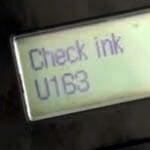
Canon inkjet printers calculate ink level estimates of all installed ink cartridges using the average page coverage and how many pages have been printed with the cartridge historically. When your Canon printer gets to a point when it believes the cartridge is empty you will be presented with a ‘Check Ink’ U162 or U163 message and be prompted to replace the cartridge. This message will also stop you printing and scanning.
Most users will have come across this message just after installing a refilled or remanufactured Canon inkjet cartridge. As the ink level cannot be reset when producing refurbished cartridges, a low ink or the ink may have run out message will almost certainly appear with very little use.
Quick Video Guide
Can I bypass the Check Ink U162/U163 error code?
Even if you have received this message after using a new Canon ink cartridge there is almost certainly some residual ink that can be used in the cartridge. This is because the Canon software/hardware has a tendency to overestimate how much ink has been used when printing or even cleaning using a cartridge. Thankfully it only takes a single button press to get past this message and you can continue with uninterrupted printing until the ink has physically run out. Firstly locate the STOP/RESET/RESUME button on the body of your printer which is represented by an upside down triangle in a circle and is usually red or grey in colour. Now that you can see the button hold it down for at least five seconds before releasing.

This basic prompt indicates to your Canon printer that you are aware of the ink level being potentially low and would like to continue printing regardless of this. The ink level estimate presented will not reset and will still show as the cartridge being out of ink, but will in no way further hinder your printing. Just keep an eye on the quality of your prints and when colours start to disappear or fade you will know a change in cartridge is necessary.
Can this damage my printer?
No. Whilst continued use of a physically empty cartridge can cause parts of the printhead to overheat and cease functioning this will not affect any of the printers covered in this article. This is down to the simple fact that the printhead is contained in the cartridge rather than the printer itself. As such even if you printer was left printing with an empty cartridge for an extended period of time the worst that could happen is that a new cartridge would be required.
What Canon printers does this work with?
This advice applies to a variety of Canon printers that are compatible with the Canon PG-37, CL-38, PG-40, CL-41, PG-50 and CL51 range of ink cartridges. These printers include the Canon Fax JX200, MultiPass 450, MultiPass MP150, MultiPass MP160, MultiPass MP170, Pixma iP1200, Pixma iP1300, Pixma iP1600, Pixma iP1700, Pixma iP1800, Pixma iP1900, Pixma iP2200, Pixma iP2400, Pixma iP2500, Pixma iP2600, Pixma MP140, Pixma MP150, Pixma MP160, Pixma MP170, Pixma MP180, Pixma MP190, Pixma MP210, Pixma MP220, Pixma MP450, Pixma MP460, Pixma MP470, Pixma MX300 and Pixma MX310. Which of these six possible cartridges your printer takes will depend entirely upon the model of your printer.
Along with the printer models mentioned above this reset button can be used to continue printing using the PG-510, CL-511, PG-512 and CL-513 range of ink cartridges. The following printers are all compatible with these black and colour cartridges, the Canon Pixma iP2700, Pixma iP2702, Pixma MP230, Pixma MP240, Pixma MP250, Pixma MP252, Pixma MP260, Pixma MP270, Pixma MP272, Pixma MP280, Pixma MP282, Pixma MP330, Pixma MP480, Pixma MP490, Pixma MP492, Pixma MP495, Pixma MP499, Pixma MX320, Pixma MX330, Pixma MX340, Pixma MX350, Pixma MX410 and Pixma MX420.
I hope you have found this post useful. Please let us know if you have any other questions via any of our social media platforms.

