

Troubleshooter
Problem with a Dell Toner Cartridge or Drum Unit
My Toner Cartridge is producing a poor quality print
Dell Laser Printers typically have two distinct versions; those that include the drum unit as part of the cartridge and those that have the drum unit as a consumable that is replaced seperately from the main toner cartridge. In order to correctly diagnose and resolve this issue it is important to know which type of printer you are using.
If your printer uses cartridges that have an integrated drum then the cartridge itself will have an integrated green/blue cylindrical roller such as the cartridge in the picture below; you may have to gently push back a protective covering flap to expose this roller. This cartridge type is most commonly used in monochrome Dell laser printers. If your cartridge has a roller but it is covered in toner then this is a transfer roller, not a drum roller and it is likely that your printer has a seperate drum unit.
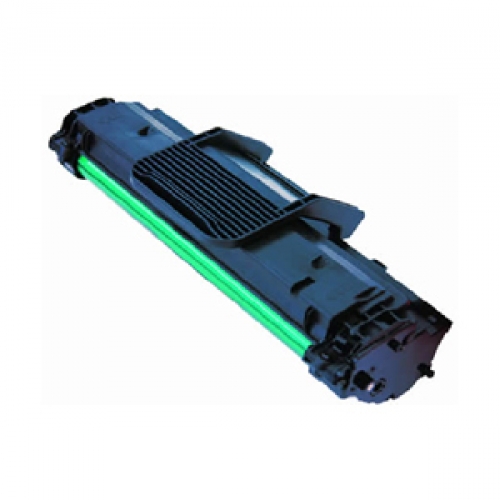
If the printer is using a cartridge which has a drum unit included within it then this makes troubleshooting a little easier as there are less potential consumables that could be at fault. If the print that you were receiving from your old cartridge was perfect right up until the point where the printer requested a new toner then after replacing it the pages produced instantly looked poor, it is incredibly likely the toner cartridge is at fault but first please try the following:
- Remove the cartridge from the printer and gently rock from side to side; often toner can 'clump' in to one end of the cartridge and performing this process can distribute it evenly throughout the toner cartridge.
- Print a dozen pages or so with the cartridge to ensure that the toner rollers have been suitably covered and that the photoconductor of the drum has been given a chance to establish a static charge.
If the poor print continues please it is possible that you have a faulty cartridge so please contact us so that we can potentially perform further troubleshooting before replacing the cartridge if necessary.
If your printer uses cartridges that rely on a seperate photoconductor within the printer then typically they will look more like simple tubes filled with toner such as in the picture below. These types of toner cartridges are most commonly used in colour Dell laser printers however some monochome laser printers utilise a seperate photoconductor.
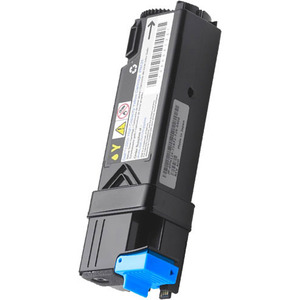
If you have this type of printer and the print that you were receiving from your old cartridge was perfect right up until the point where the printer requested a new toner then after replacing it the pages produced instantly looked poor, it is incredibly likely the toner cartridge is at fault. If your machine is a colour printer then it may be worth printing out a test page to ensure that it is definitely the cartridge that you have just replaced is definitely the one causing the problem. Such a sheet can be located by clicking here - Simply printing out this page should easily confirm which colour is causing the issue.
If however, the pages that were produced with the old toner cartridge and drum were poor and then continued to remain poor after the toner was replaced then chances are that your drum unit needs replacing. Before buying a new drum unit please click back and follow the instructions for 'My Drum Unit is producing poor quality prints' to further diagnose.
If after reading the above it has been established that the toner cartridge is the cause of the poor quality prints then there is relatively little that can be done in order to troubleshoot however we would first suggest doing the following:
- Remove the cartridge from the printer and gently rock from side to side; often toner can 'clump' in to one end of the cartridge and performing this process can distribute it evenly throughout the toner cartridge.
- Print a dozen pages or so with the cartridge to ensure that the toner rollers have been suitably covered and that the photoconductor of the drum has been given a chance to establish a static charge.
^ Go back a level ^« Return to Helpdesk Home

