

Troubleshooter
Problem with a Canon Toner Cartridge or Drum Unit
My print has a consistent dot running down the page
In the case of a Canon printer, a consistent dot running down the same area of the page would almost certainly be caused by a small amount of glue or some other foreign material being present on the circular drum roller that is part of the toner cartridge.
The instructions will vary slightly from machine to machine but in order to resolve this problem we need to clean off the offending material which can be done in a way similar to the following method. You may need to pull back a flap to expose the circular drum unit or it may be pre-exposed.
1.Remove the toner cartridge from your printer and position the print sample above the unit. This should allow you to locate the area of the drum which is causing the poor print.

2. Turn the drum unit gear by hand while looking at the surface of the drum. Stop turning once you have found the offending mark.
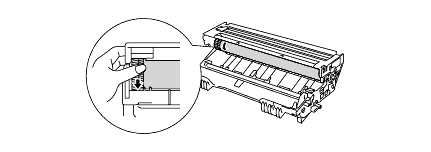
3. Wipe the surface of the drum with a cotton swab until the mark, dust, glue or paper deposit on the surface of the drum comes off. Reinstall the drum unit.

If the problem still persists please contact us to perform further troubleshooting.
^ Go back a level ^« Return to Helpdesk Home

