

Troubleshooter
Problem with a Brother Toner Cartridge or Drum Unit
My new drum unit is producing poor quality prints
If the print that you were receiving from your old drum unit was perfect right up until the point where the printer requested a new drum then after replacing it the pages produced instantly looked poor, it is incredibly likely the drum unit is at fault. If the pages that were produced with the old toner cartridge and drum were poor and then continued to remain poor after the drum was replaced then chances are that your toner cartridge needs replacing. Before buying a new toner cartridge please click back and follow the instructions for 'My Toner Cartridge is producing poor quality prints' to further diagnose.
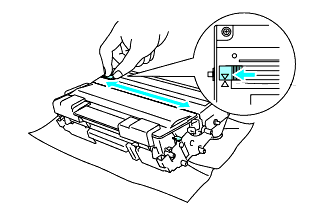
If after reading the above it has been established that the drum unit is the cause of the poor quality prints then we would suggest cleaning the drum unit. Specific instructions for doing this will be provided in your user manual however a popular method is to clean the corona wire by locating a blue or green tab on the drum unit and then gently sliding it from right to left and left to right several times (see below). Return the tab to the home position before you put the drum unit back in the printer.
 If you are getting 'spots' on your prints then this is likely to be a dirty drum unit so please click the back button and select the article 'My print has a consistent dot running down the page'
If problems still persist then it is likely that the drum unit is faulty so please contact us for further assistance.
^ Go back a level ^« Return to Helpdesk Home

